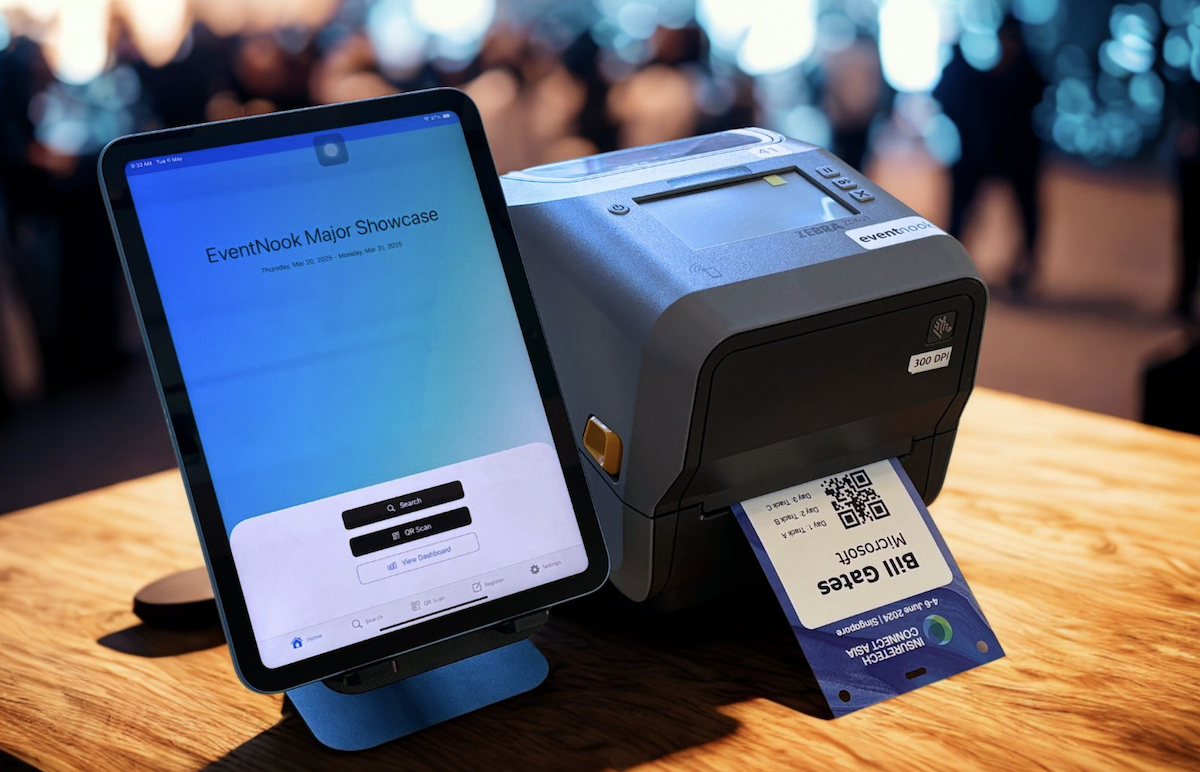
Check-in kiosks that print the badge as guests arrive
Guests scan their QR code or look themselves up, confirm their details, and walk off with a printed name badge. Self-service kiosks and staffed counters for conferences, summits and corporate events at Marina Bay Sands, Suntec and venues across Singapore.
Trusted at events for





From the door to a printed badge in four taps
This is the self-service flow your guests see. Nobody has to queue for a staff member, and every check-in lands straight in your EventNook attendee list.
Choose how to check in
Guests scan the QR code from their confirmation, or search for themselves.
Scan or search
The camera reads the QR code, or the guest types the email, name or other field you choose.
Confirm the details
Name, job title, company and ticket type appear on screen, with table and seat if you assign them.
Print and walk in
The badge prints on the spot, and the kiosk resets itself for the next guest.
Kiosk screens shown as an illustration. Your kiosk uses your event name, colours and badge design.
One kiosk app, four ways to run your entrance
Each station runs the EventNook kiosk app on a tablet or laptop. Mix station types to suit your venue and your guests.
Self-service kiosk
Guests check themselves in and collect their badge, with no staff needed at the screen.
- Scan QR or find yourself
- Picker when several guests match
- Resets for the next guest
Staffed counter
Your team or ours looks guests up, checks them in and prints on demand. Ideal for VIPs and anyone who needs help.
- Search by name, email, mobile or company
- Filter checked-in and absent guests
- Undo a check-in or reprint a badge
Walk-in registration
Guests who haven't registered sign up on the spot, then check in like everyone else.
- QR code to your registration form
- Or register on the kiosk itself
Handheld entry scanning
Staff walk the queue with a phone or tablet and scan tickets before guests reach the counter.
- QR codes and common barcodes
- Automatic or tap-to-confirm check-in
- Distinct alert for repeat scans
At the AWS Executive Forum in Singapore, self-service QR scanning and staff-assisted lookup ran side by side, and stations were rearranged as the room filled. Read how the setup was planned.
A better first impression for major brands
The arrival is the first part of an event guests experience. These organisers chose EventNook kiosks and onsite badge printing to get it right.
5,000 delegates through self-service kiosks with no queues
Thank you for providing such an excellent service. Everyone was impressed, and I've honestly never experienced such a stress-free congress when it comes to badge printing.Head of Events, World Physiotherapy Congress 2025
See the kiosks at real events
Short videos from conferences, trade shows, award ceremonies and campus events where EventNook ran check-in and badge printing.
Everything the kiosk does
Built for real event entrances: fast when it's busy, forgiving when guests aren't sure how they registered.
Check-in
Badge printing
Branding & control
Use your own devices, or let us bring the whole kit
A kiosk station is a tablet or laptop, a badge printer and a reliable connection. Rent them from us with setup and supervision, or run the app on devices you already have.

How many kiosks do you need?
Plan for your arrival peak, not your total headcount. Our rule of thumb is about six stations for 1,000 guests arriving within an hour.
Event kiosk questions
What equipment does a check-in kiosk need?
A tablet or computer running the EventNook kiosk app in a modern browser, a badge printer and an internet connection. The printer can sit beside the kiosk (USB, network or AirPrint) or be an EventNook cloud print station. You can use your own devices, or rent the full kit with setup and supervision.
Can guests check in without their QR code?
Yes. With "Find & Check-in", guests search on the field you choose: email, name, mobile, company or ticket code, for example. If several people match, the kiosk asks "Which one is you?".
How fast is kiosk check-in?
About two seconds from QR scan to printed badge, as at the NCS Impact Forum and for KPMG. ServiceNow's summit averaged under ten seconds per guest. One device typically handles 100 to 300 guests an hour.
What about walk-ins?
The kiosk can show a QR code that opens your registration form on the guest's phone, or let them register on the kiosk itself. Once registered, they check in and get a badge like everyone else.
Can the kiosk match our brand?
Yes. Choose from 15 built-in themes or use your own colours, set your own welcome screen, and print badges from a template designed for your event.
What happens if someone scans twice?
The kiosk shows that the guest is already checked in and plays a different sound. You decide whether already-checked-in guests can reprint their badge.
Do we have to use EventNook for registration?
No. Onsite check-in and badge printing are priced separately and work with an attendee list exported from Eventbrite, Luma or a spreadsheet. See pricing.
Can EventNook staff run the kiosks for us?
Yes. With Onsite Plus, our onsite team sets up, tests and supervises the kiosks at your venue. With Onsite Express, your own team runs them, backed by training videos and email support. See our onsite badge printing service.
Give your guests a faster welcome
Tell us your date, venue and expected turnout. We'll suggest a kiosk layout and show you the check-in flow with your own badge.